
Booking Team User Guide
Booking Team Guide
Receiving and Processing Referrals Following Clinical Triage
This guide provides detailed instructions for Secondary Care (hospital) booking and administration teams who receive eyecare referrals through the OPERAi Electronic Referral System.
It explains how referrals are received following clinical triage, how to access the attached referral documentation, what information booking teams should review, and how to communicate with the referring clinician when required.
The guide is intended to support staff who may be unfamiliar with OPERAi and provides practical guidance on how the electronic referral process fits into existing hospital booking procedures.
Booking teams do not need to log into OPERAi.
Once a referral has been clinically triaged and accepted for hospital booking, the referral documentation is sent by email to the designated booking team.
Booking teams should continue to use their existing hospital systems and established administrative procedures to process referrals and arrange patient appointments.
There is no change to the existing hospital booking process.
1. Understanding the Referral and Booking Process
OPERAi supports the electronic management of eyecare referrals between Primary Care Optical Practices and Secondary Care (hospital) ophthalmology services.
When an optometrist identifies a patient who requires further assessment or treatment within a hospital setting, a referral can be created and submitted electronically through OPERAi.
The referral is then made available to the receiving hospital's clinical triage team.
An authorised Secondary Care clinician reviews the referral, assesses the clinical information and determines the most appropriate next action.
Where the referral is accepted for hospital booking, the relevant referral documentation is sent by email to the designated hospital booking team.
The booking team can then process the referral through the hospital's existing administrative and appointment booking procedures.
The Referral Journey
Optical Practice submits referral through OPERAi
↓
Secondary Care clinician reviews and triages referral
↓
Referral accepted for hospital booking
↓
Referral documentation emailed to booking team
↓
Booking team processes referral using existing hospital procedures
The Role of the Booking Team
The booking team's involvement begins once the accepted referral documentation has been received.
At this stage, the clinical triage decision has already been completed by an authorised clinician.
The booking team is responsible for the administrative processing of the referral and arranging the next steps in accordance with existing hospital procedures.
Booking teams are not required to undertake clinical triage, interpret clinical findings or determine the clinical priority of a referral.
OPERAi supports the electronic referral process up to the point at which the referral is accepted and forwarded for booking.
The hospital's existing appointment booking procedures remain unchanged.
2. Receiving a Referral by Email
Following acceptance for hospital booking, an automated email is sent to the designated booking team.
The email contains a summary of the referral and includes a PDF attachment containing the referral documentation.
The email provides sufficient information to help booking teams identify the patient, understand the stated referral priority and determine the clinical speciality involved.
Understanding the Email Subject
The email subject line contains important information about the referral.
This includes:
- Patient Name: The name of the patient being referred.
- NHS Number: The patient's NHS identifier.
- Referral Priority: The priority associated with the referral.
For example:
Referral for: MORECAMBE BAY XXTEST
NHS Number: 54545454
Priority: Routine
This information allows booking teams to identify the referral before opening the attached PDF.
However, the email subject should not be used as the sole source of information when processing the referral.
The attached referral document should always be reviewed.
Understanding the Referral Notification
The main body of the email contains a prominent heading confirming that a referral document has been attached.
The referral priority is also displayed.
For example:
Referral Attached
RoutineReferral for VITREORETINAL
The speciality identifies the clinical service to which the patient has been referred.
In the example provided, the referral is for the Vitreoretinal service.
Booking teams should use this information alongside the referral documentation to confirm the intended receiving service.
Patient Information in the Email
The email also includes:
- Patient name.
- Patient NHS number.
- Patient date of birth.
These details can be used to identify the correct patient within the hospital's existing patient administration system.
Always use the required patient identifiers when locating or updating a patient record.
Do not rely solely on the patient's name, as patients may have similar or identical names.
The referral priority shown in the email should be considered alongside the clinical information and any booking instructions provided.
Always follow your organisation's established procedures for managing referrals according to their priority.
Where the priority is unclear or appears inconsistent, seek clarification from the appropriate clinical team.
3. Opening the Referral Attachment
The automated referral email includes a PDF attachment containing the referral documentation.
This document provides the information required to support the hospital's existing booking process.
How to Open the Referral
- Open the referral email received in the designated hospital booking mailbox.
- Locate the PDF attachment displayed near the top of the email.
- Select the attachment to open or preview the document.
- Review the referral information contained within the PDF.
- Where necessary, download the document in accordance with your organisation's approved information governance procedures.
The referral PDF contains a summary page followed by the detailed clinical referral form.
Both pages should be reviewed to identify the information relevant to the booking process.
Referral documents contain confidential patient and clinical information.
Only access, download, store or share these documents where authorised and necessary for your role.
Always follow your organisation's information governance and data protection procedures.
4. Understanding the Referral Email
The referral email contains several sections designed to help booking teams identify the referral and access the relevant documentation.
Referral Priority
The referral priority is displayed prominently within the email.
In the example provided, the referral is identified as Routine.
The priority should be reviewed when processing the referral and arranging the next administrative steps.
Clinical Speciality
The email identifies the speciality to which the patient has been referred.
For example:
Referral for VITREORETINAL
This helps booking teams identify the appropriate hospital service.
Patient Demographics
The email contains the patient's name, NHS number and date of birth.
These details should be checked against the hospital's existing patient record.
Referral Attachment
The attached PDF contains the full referral documentation.
Booking teams should open the attachment and review the relevant information before processing the referral.
Supporting Clinical Imaging
The email explains that where clinical imaging is available, it can be accessed using the imaging link within the attached PDF.
Not every referral will include additional clinical imaging.
Contacting the Referrer
The email advises that users should not reply directly to the automated message.
Where communication with the referring clinician is required, the feedback link within the PDF should be used.
5. Understanding the Referral PDF
Once a referral has been clinically triaged and accepted for booking, the relevant referral documentation is sent to the designated Secondary Care booking team as a PDF attachment within the automated referral email.
The PDF contains information originally submitted by the referring Optical Practice and provides a record of the patient's referral.
It includes patient demographics, referring clinician details, clinical information and the intended receiving hospital service.
Although the referral has already undergone clinical triage, booking teams should familiarise themselves with the information contained within the document.
This will help ensure that referrals are processed accurately and that the appropriate patient, hospital service and booking requirements are identified.
The example referral document consists of two pages:
- Page 1 – NHS NET Referral Information: Provides a summary of the referral, including patient details, the referring clinician, the unique referral reference, a feedback link and information about supporting clinical imaging.
- Page 2 – WGOS Clinical Referral Form: Contains the detailed clinical referral information submitted by the optometrist, including patient demographics, clinical findings, referral destination, visual acuity and additional supporting information.
The following sections explain each page and highlight the information most relevant to booking teams.
Page 1: NHS NET Referral Information
The first page of the PDF provides an overview of the referral and is headed NHS NET Referral Information.
This page is particularly useful for booking teams because it brings together the key information required to identify the patient, confirm the source of the referral and access the feedback function where communication with the referring clinician is necessary.
The document is marked Private & Confidential, as it contains identifiable patient and clinical information.
It must therefore be handled in accordance with your organisation's information governance procedures.
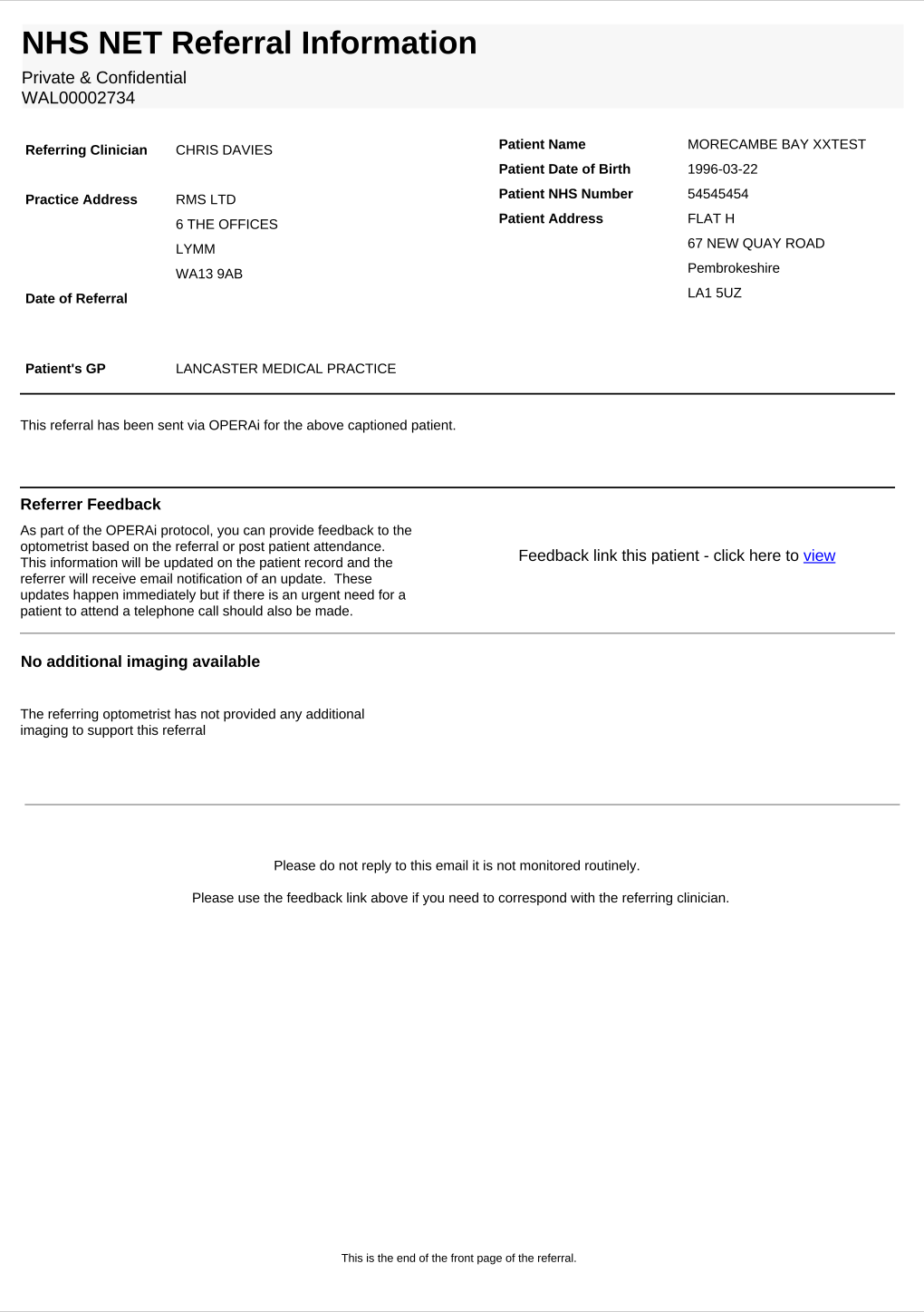
Figure 1: NHS NET Referral Information – Referral Summary Page (click to enlarge)
Referral Reference
At the top of the document, beneath the NHS NET Referral Information heading, you will see a unique referral reference number.
In the example shown in Figure 1, the referral reference is WAL00002734.
This reference identifies the individual referral and can be useful when communicating with other hospital departments or seeking clarification.
The referral reference should not be confused with the patient's NHS number.
A patient may have more than one referral, and each referral may have its own unique reference.
Referring Clinician and Optical Practice
The left-hand section of the referral summary contains information about the clinician and Optical Practice responsible for submitting the referral.
This includes:
- Referring clinician's name.
- Practice address.
- Date of referral, where recorded.
This information helps identify the source of the referral where clarification is required.
Patient Information
The right-hand section contains the patient's demographic information.
This includes:
- Patient name.
- Date of birth.
- NHS number.
- Patient address.
The summary also identifies the patient's registered GP practice.
Booking teams should use the relevant patient identifiers to locate the correct patient record within their existing hospital systems.
Always check the patient details against the hospital's existing patient record before progressing with booking.
If any information appears incorrect or does not match, follow your organisation's established patient identification and data quality procedures.
Referrer Feedback
The first page contains a Referrer Feedback section.
This provides a link that can be used to communicate with the referring optometrist through OPERAi.
The feedback section contains a hyperlink labelled:
Selecting the view hyperlink opens the feedback screen associated with the referral. Further details outlined in Section 7.
This function can be used to provide relevant information to the referring clinician, including feedback relating to the referral or following patient attendance.
When feedback is submitted, the information is updated against the patient's referral record.
The referring clinician receives an email notification advising that an update has been provided.
The referral document confirms that these updates take place immediately.
Where there is an urgent need for the patient to attend, a telephone call should also be made.
Supporting Clinical Imaging
The first page also contains information about the availability of supporting clinical imaging.
Where imaging is available, an imaging link to the PACS viewer will be provided within the document.
Where no additional imaging has been supplied, the document will display a message confirming that no images are available.
In the example shown in Figure 1, the document states:
The referring optometrist has not provided any additional imaging to support this referral.
Booking teams are not expected to clinically interpret diagnostic images.
Where clinical clarification is required, the matter should be directed to the appropriate hospital clinical team.
Page 2: WGOS Clinical Referral Form
The second page of the PDF contains the WGOS Referral Form.
This is the detailed clinical document completed by the referring optometrist when submitting the referral through OPERAi.
The form provides a structured record of the patient's clinical assessment, the reason for referral and the intended receiving service.
Although this information has already been reviewed during clinical triage, booking teams may need to refer to certain sections when processing the referral or arranging the patient's appointment.
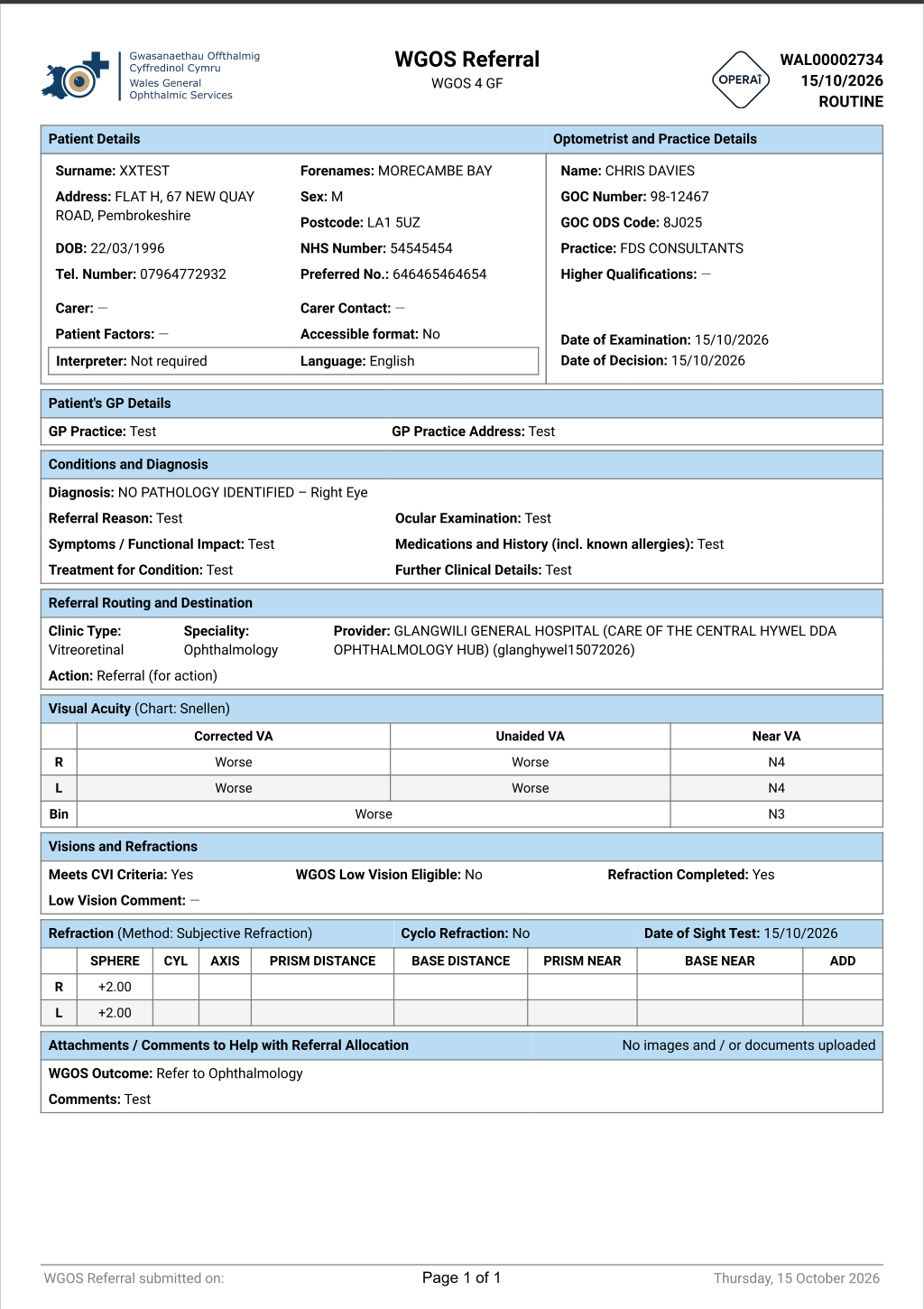
Figure 2: WGOS Clinical Referral Form – Patient Details, Clinical Information and Referral Destination (click to enlarge)
Patient Details
The first section of the WGOS Referral Form contains patient demographic and contact information.
This includes:
- Patient surname and forename.
- Patient address and postcode.
- Date of birth.
- NHS number.
- Telephone number.
- Preferred contact number.
- Carer information, where supplied.
- Interpreter requirements.
- Preferred language.
- Accessible communication requirements.
For booking teams, this is one of the most relevant sections of the clinical referral form.
The information can help identify how the patient should be contacted and whether any additional communication arrangements may be required.
Telephone and Preferred Contact Number
The referral may contain both a telephone number and a preferred contact number.
Where a preferred contact number has been provided, booking teams should take this into consideration when contacting the patient, in accordance with local procedures.
Interpreter and Accessibility Requirements
The referral may identify whether the patient requires an interpreter or accessible communication arrangements.
These details should be reviewed when arranging an appointment to ensure that any relevant communication needs are considered.
Where additional support is required, booking teams should follow their organisation's existing procedures for arranging appropriate assistance.
Optometrist and Practice Details
This section identifies the referring optometrist and Optical Practice.
It includes:
- Referring clinician's name.
- General Optical Council registration number.
- Practice ODS code.
- Optical Practice name.
- Relevant qualifications, where recorded.
- Date of examination.
- Date of referral decision.
Patient's GP Details
The referral contains a section identifying the patient's registered GP practice.
This may include the GP practice name and address.
Conditions and Diagnosis
This section contains the clinical information recorded by the referring optometrist.
It may include:
- Diagnosis.
- Referral reason.
- Symptoms and functional impact.
- Ocular examination findings.
- Relevant medications and history.
- Treatment information.
- Further clinical details.
Booking teams should not amend or reinterpret clinical findings.
Any clinical questions should be directed to the appropriate hospital clinical team.
Referral Routing and Destination
This section identifies the hospital service to which the patient has been referred.
It includes:
- Clinic type.
- Clinical speciality.
- Receiving hospital or provider.
- Referral action.
In the example shown in Figure 2:
- Clinic Type: Vitreoretinal.
- Speciality: Ophthalmology.
- Provider: Glangwili General Hospital, care of the Central Hywel Dda Ophthalmology Hub.
- Action: Referral (for action).
This information helps booking teams confirm the intended destination of the referral.
Visual Acuity
The Visual Acuity section contains the patient's recorded vision measurements.
These may include corrected, unaided and near visual acuity measurements.
Booking teams are not required to interpret these results.
Visions and Refractions
The referral may contain further clinical information relating to the patient's vision.
This may include:
- CVI eligibility information.
- Low Vision eligibility information.
- Whether refraction has been completed.
- Refraction measurements.
- Date of sight test.
This information forms part of the clinical referral record.
Attachments and Additional Comments
Towards the bottom of the WGOS Referral Form, there is a section for attachments and comments to assist with referral allocation.
This section may identify whether additional documents or images were supplied by the referring optometrist.
It may also contain comments relevant to the referral.
In the example shown in Figure 2, the document confirms that no additional images or documents were uploaded.
6. Accessing Supporting Clinical Imaging
Some referrals may include supporting clinical images.
Where imaging is available, the referral email explains that it can be accessed using the imaging link within the attached PDF document.
How to Identify Whether Imaging Is Available
- Open the referral PDF.
- Review the first page of the document.
- Locate the section relating to additional clinical imaging.
- Check whether an imaging link is available.
- Where access is required for your role, follow the relevant link.
Not every referral will include additional clinical imaging.
Where no images have been supplied, the PDF will indicate that no additional imaging is available.
Booking teams are not expected to clinically interpret diagnostic images.
Where imaging is relevant to clinical decision-making, the appropriate clinical team should review the information.
7. Using the Referrer Feedback Link
The referral PDF includes a feedback function that allows authorised hospital staff to communicate with the referring optometrist.
Rather than replying directly to the automated referral email, users should use the feedback link provided within the referral document.
Where Is the Feedback Link?
The feedback link is located on the first page of the referral PDF within the Referrer Feedback section.
The section contains a link labelled:
Feedback link this patient – click here to view
How to Access the Feedback Screen
- Open the referral email.
- Open the attached PDF document.
- Locate the Referrer Feedback section.
- Select the view hyperlink.
- The feedback screen will open.
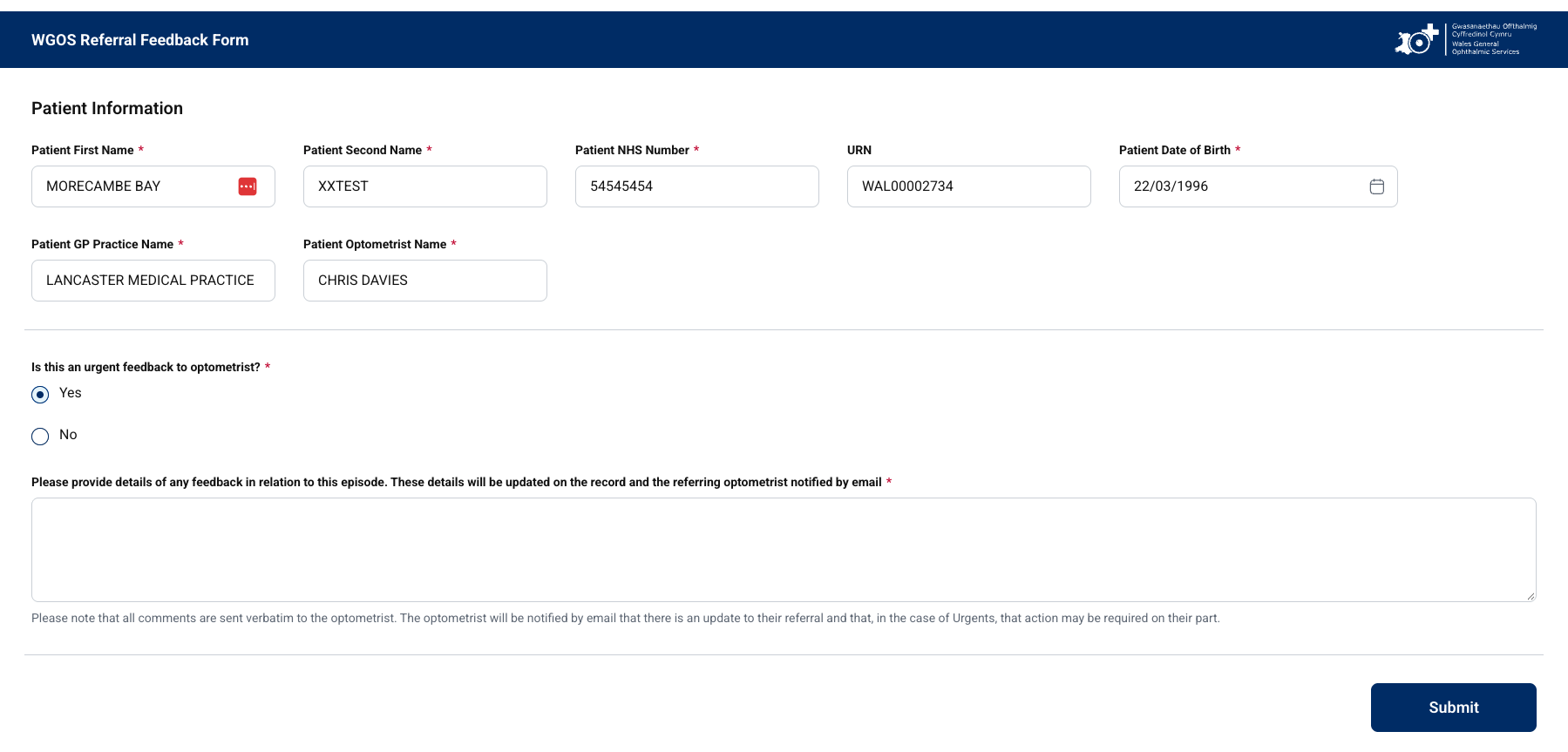
Figure 3: OPERAi Referral Feedback Screen (click to enlarge)
When Should the Feedback Function Be Used?
The feedback function can be used where communication with the referring clinician is required in relation to the referral.
Examples may include:
- Requesting clarification of referral information.
- Providing relevant administrative feedback.
- Communicating information following patient attendance.
- Providing updates relevant to the referral.
What Happens After Feedback Is Submitted?
When feedback is submitted through the OPERAi feedback process, the information is recorded against the patient's referral.
The referring clinician receives an email notification indicating that an update has been provided.
The update is made available immediately through the configured OPERAi workflow.
The automated referral email is not routinely monitored.
If you need to communicate with the referring optometrist, use the feedback link contained within the referral PDF.
For urgent matters requiring immediate action, follow the appropriate direct communication and escalation procedures.
8. Processing the Referral for Booking
Once the referral email and attached documentation have been reviewed, the booking team can progress the referral through the hospital's existing booking process.
The exact administrative steps may vary between Health Boards and hospital services.
Step 1: Confirm the Patient
Use the patient information provided within the referral email and PDF to locate the correct patient record.
Check the required patient identifiers and resolve any discrepancies using the established local procedure.
Step 2: Confirm the Receiving Service
Review the referral speciality and hospital destination.
Confirm that the referral has been received by the appropriate booking team or service.
Step 3: Review the Referral Priority
Identify the priority displayed within the email and referral documentation.
Ensure the referral is processed in accordance with the hospital's established prioritisation and booking procedures.
Step 4: Review Relevant Booking Information
Check the patient contact information and any recorded communication or accessibility needs.
Where additional support is required, follow the relevant hospital process.
Step 5: Process the Referral
Complete the necessary administrative actions within the hospital's existing patient administration and booking systems.
Step 6: Arrange the Appointment
Where appropriate, progress the referral for appointment booking using the existing hospital process.
Any appointment communication should follow the organisation's usual procedures.
9. Managing Urgent Referrals
Some referrals may require more immediate administrative action depending on their clinical priority.
The referral email contains specific guidance regarding urgent referrals.
Where a patient needs to attend within a short time period, the email advises that the patient should be contacted directly.
If a referral requires urgent attendance, follow your hospital's established urgent booking and escalation procedures.
Where immediate patient contact is required, do not rely solely on routine written appointment communication.
Ensure the appropriate clinical or administrative team is informed in accordance with local procedures.
Booking teams should not independently change the clinical priority assigned to a referral.
Where the priority appears unclear or inconsistent, seek clarification from the appropriate clinical team.
10. Common Questions and Troubleshooting
Do booking teams need an OPERAi account?
No. Booking teams receive accepted referrals by email and continue using their existing hospital systems to manage appointments.
What should I do if the referral PDF is missing?
Check whether the attachment is available within the email.
If the attachment is missing or cannot be opened, contact the OPERAi help desk on operaiwales@referral.solutions.
What if the patient cannot be found?
Check the patient identifiers provided within the referral.
If the patient cannot be located, follow the hospital's existing patient registration and identification procedures.
What if the referral has been sent to the wrong team?
Review the speciality and receiving hospital information.
Where the referral appears to have been incorrectly directed, follow the established local process for clarification or internal redirection.
What if I need to contact the referring optometrist?
Use the feedback link on the first page of the referral PDF.
Do not reply to the automated referral email.
What if the referral contains no clinical images?
Not every referral will include supporting imaging.
Where no imaging has been provided, the referral PDF will indicate that no additional imaging is available.
What if the referral is urgent?
Follow the hospital's urgent referral procedures and arrange direct patient contact where required.
Any uncertainty regarding clinical urgency should be escalated to the appropriate clinical team.
11. Booking Team Checklist
Before completing the administrative processing of a referral, confirm the following:
☐ Referral email received.
☐ PDF attachment opened successfully.
☐ Correct patient identified.
☐ NHS number and date of birth checked.
☐ Referral speciality confirmed.
☐ Receiving hospital or service confirmed.
☐ Referral priority reviewed.
☐ Relevant patient contact details reviewed.
☐ Communication or accessibility requirements checked.
☐ Any required clarification escalated appropriately.
☐ Referral processed using existing hospital procedures.
☐ Appropriate booking action completed.
12. Summary
OPERAi supports the electronic referral process between Primary Care Optical Practices and Secondary Care ophthalmology services.
Following clinical triage and acceptance for hospital booking, the referral documentation is sent to the designated booking team by email.
The booking team does not need to access the OPERAi application.
Instead, staff should review the referral email, open the attached PDF and process the referral using their existing hospital booking systems and administrative procedures.
Where communication with the referring optometrist is required, the feedback link within the PDF provides the appropriate route.
There is no change to the existing hospital booking process.
OPERAi provides the referral documentation electronically following clinical triage.
Booking teams should continue using their established systems and procedures to arrange patient appointments.
OPERAi Electronic Eyecare Referral System
Secondary Care Booking Team Training Guide